

What Happens When Your Domain Expires?
The stages an expired domain goes through, how to renew it at each stage and when it is deleted for good.
- Estimated Time
- 5 minutes
- Difficulty
- Easy
- Steps
- 2 steps
- Last Updated

On This Page
Your domain does not disappear the moment it expires; it goes through several stages. What you can do differs at each stage. This article covers the process for .com, .net and .org domains.
The Process Stage by Stage
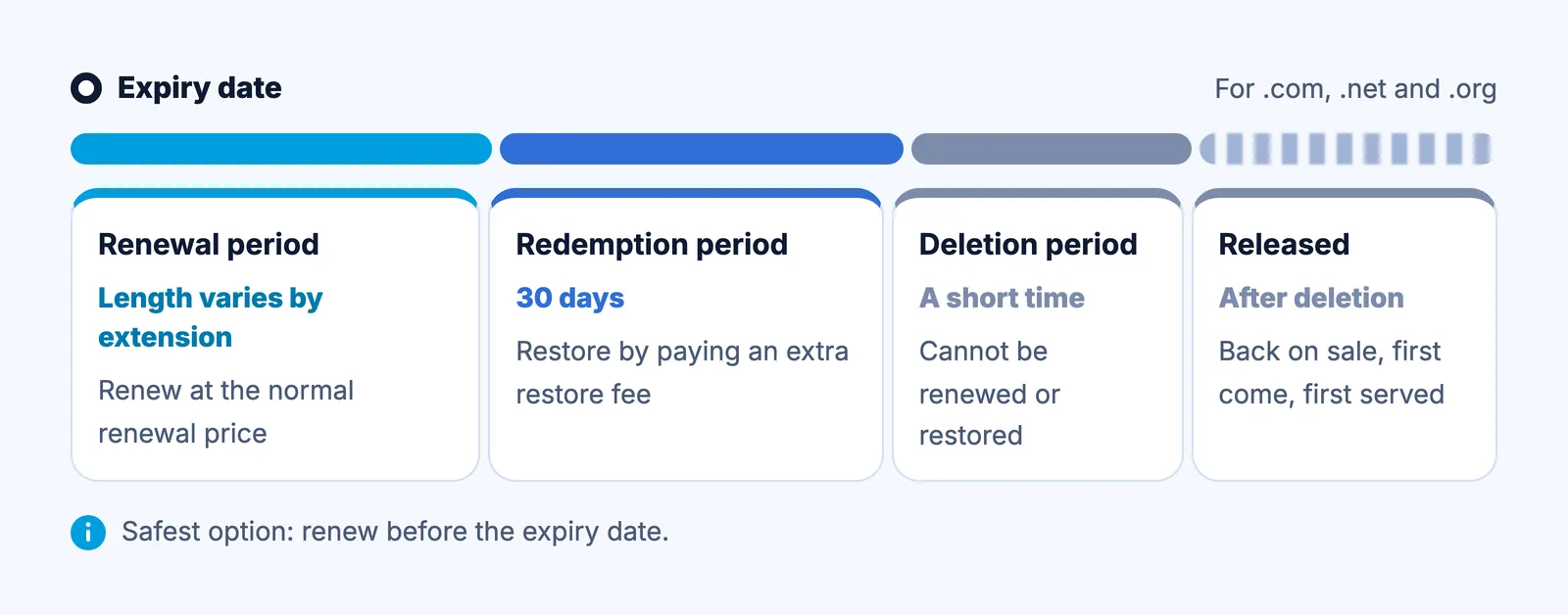
| Stage | Duration | What Can You Do? |
|---|---|---|
| Renewal period | After the expiry date; length depends on the extension | Renew at the normal renewal price |
| Redemption period | 30 days | Restore it by paying an additional restore fee |
| Pending delete | A short period | Renewal is not possible; you have to wait for deletion |
| Release | After deletion | The domain goes back on sale on a first-come, first-served basis |
Renewal Period
After the expiry date, you can still renew your domain at the normal renewal price for a while. How long depends on the extension. Your website and email may stop working during this stage, so we recommend renewing before the expiry date.
Redemption Period
If you miss the renewal period, your domain enters the redemption period. For generic extensions such as .com, .net and .org, this lasts 30 days. During this time you can restore your domain by paying an additional restore fee. The restore fee is higher than the normal renewal price and varies by extension; contact our support team for the current fee.
Pending Delete
If the redemption period also ends, the domain enters the pending delete stage. There is no payment option at this stage, so the domain can neither be renewed nor restored. Once deletion is complete, the domain is released and offered for sale again on a first-come, first-served basis.
How to Renew Your Domain
0 of 2 steps done
Step 1: Find Your Invoice
At portal.adveyer.com, open the "Account/Invoices" menu and select the invoice for the domain.
Step 2: Make the Payment
Complete the payment with one of the payment methods offered on the invoice. The renewal is processed with the payment.
The process is different for .tr domains (Turkey's country-code domains): under Turkish regulations, use of a .tr domain that is not renewed on time is suspended for two months, and it can be renewed during that period. If that period also passes, the domain becomes available for registration again.
Domain Names
.com, .com.tr and 800+ extensions
Starting Price
$2.05/yr
Frequently Asked Questions
How many days after expiry can I still renew my domain?
The renewal period at the normal price depends on the extension. To avoid any interruption to your website and email, we recommend renewing before the expiry date. Contact our support team for the current period.
Can I renew during the redemption period?
Yes. For extensions such as .com, .net and .org, the redemption period lasts 30 days, and you can restore your domain during that time by paying an additional restore fee. The fee varies by extension; contact our support team for the current fee.
Can I renew my domain during pending delete?
No. There is no payment option during pending delete. Once deletion is complete, the domain is released and goes back on sale.